
Retests: Check Whether a Change Made AI Mention You More
How to use Prompt Tracking → Retests: how a re-test works, creating one, what control prompts are for, reading the result, and how repair tasks are re-measured automatically on their retest date.
What a re-test is for
After you change your site or content, a re-test re-runs the same prompts to see whether AI now mentions you more. Achievements records what changed on its own; Retests is where you verify one specific change.
Location: sidebar Prompt Tracking → Retests tab. Retests are part of the Business / Agency plans.
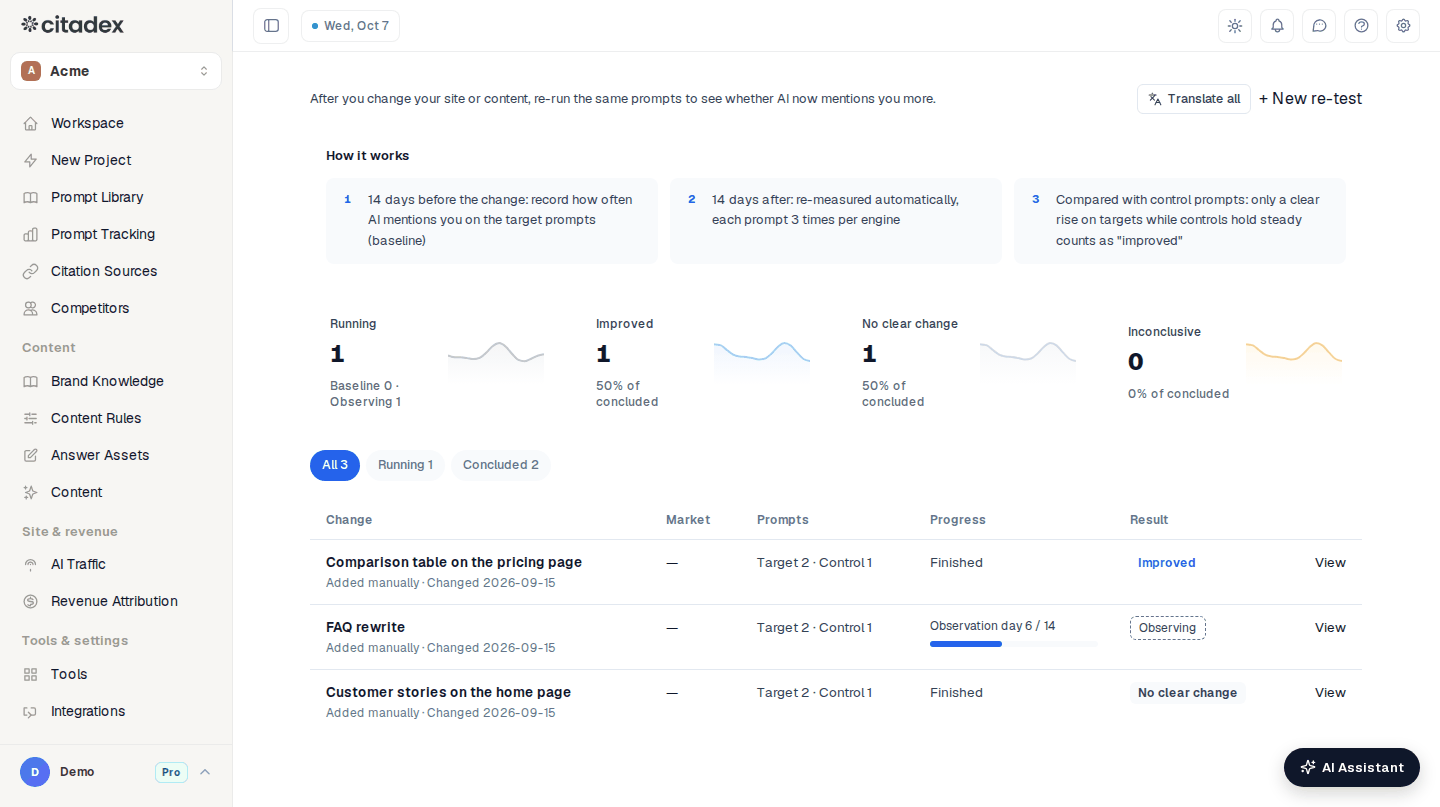
Prompt Tracking → Retests
How it works
- 14 days before the change (baseline): records how often AI mentions you on the target prompts. Scans you already have before the change date count; if there aren’t enough, measuring starts today.
- 14 days after (observation): re-measured automatically, each prompt 3 times per engine.
- Compared with control prompts: only a clear rise on the targets while the controls hold steady counts as Improved.
Create a re-test
- 1
Open the dialog
Click + New re-test to open Create a re-test for this change.
- 2
Say what changed
Under What changed, write one sentence, e.g. “Added FAQ schema to the pricing page”. Citadex picks related prompts from it.
- 3
Page and date
Page URL (optional): when filled in, a snapshot of the page is saved before and after the change, so you can compare later. Change date: everything before it is “before”, everything after is “after”.
- 4
Check the target prompts
Target prompts are the prompts this change should affect. They are picked for you; click Edit to add or remove. All prompts in a re-test come from one market.
- 5
Control prompts (usually fine as is)
Open Advanced (optional) to see the Control prompts: prompts in the same market, unrelated to this change, picked automatically. Prompts already being optimized another way (a new article, a repair task or another re-test) are skipped; if you add one yourself, you are told to consider swapping it.
- 6
Start
Click Start re-test.
Why control prompts matter
AI platforms change on their own. If the targets and the controls rise together, the platform moved, not your change. Only a rise on the targets with steady controls shows the effect of this change. A re-test without controls says in its result that no other prompts were compared over the same period.
The re-test list
- Four figures at the top: Running, Improved, No clear change, Inconclusive.
- Filters: All, Running, Concluded, and per market when there is more than one.
- Table: Change (with its source: From a repair task, From AI Writer, From thread replies, Added manually), Market, Prompts (Target · Control), Progress (e.g. “Observation day 5 / 14”) and Result. Click View for details.
Reading the result
| Result | Rule |
|---|---|
| Improved | The target rate rose and the before/after ranges don’t overlap, and the control prompts didn’t move the same way |
| No clear change | Enough answers, but the target ranges overlap (a clear drop is also reported here, and said so) |
| Inconclusive | Too few answers, too many failed checks, or the control prompts moved too |
The detail page shows:
- The Result and a one-line reason.
- Time windows: baseline and observation length, and the change date.
- What changed: Before snapshot and After snapshot; Compare opens Page before vs after with added and removed text.
- Target prompts / Control prompts: Baseline and Observed rates with their range; failed checks are listed separately and not counted.
- By engine: baseline and observation for targets and controls on each engine.
A re-test still running shows the data so far and gives its result when the window ends. To watch longer, click Observe 14 more days. An Improved re-test adds a Retest confirmed card to Achievements, and the AI Assistant’s weekly plan lists Retest results. Delete removes only the re-test; scan data is not affected.
Repair tasks are re-measured automatically
A repair task with a retest date is re-checked automatically on that date: its prompts are asked again on your plan’s engines in the task’s market, the new coverage is recorded and the task is marked done. When coverage rose, a Fix task paid off card appears in Achievements. Nothing to do by hand.
FAQ
The change went live a while ago. Can I still create a re-test? Yes. Set Change date to the real launch day; earlier scans count toward the baseline.
The result is Inconclusive. Check the reason on the detail page. With too few answers, use Observe 14 more days; if the controls moved too, the platform changed in the same period, so create a new re-test a little later.
Can target prompts span markets? No. A re-test covers one market; create one per market.
Was this article helpful?