
Brand Searches: What AI Gets Wrong When People Search for Your Brand
Prompt Tracking → Brand searches checks AI answers to your own brand searches: wrong support numbers, addresses or prices against your official facts, competitors named in brand searches, plus brand attributes and objections.
What this tab does
When people ask AI about your brand ("Brand login", "Brand customer service phone number", "is Brand legit"), a wrong phone number or web address can cost more than not being recommended. The Brand searches tab checks exactly these answers.
Where: Prompt Tracking → Brand searches. The tab has four cards, top to bottom.
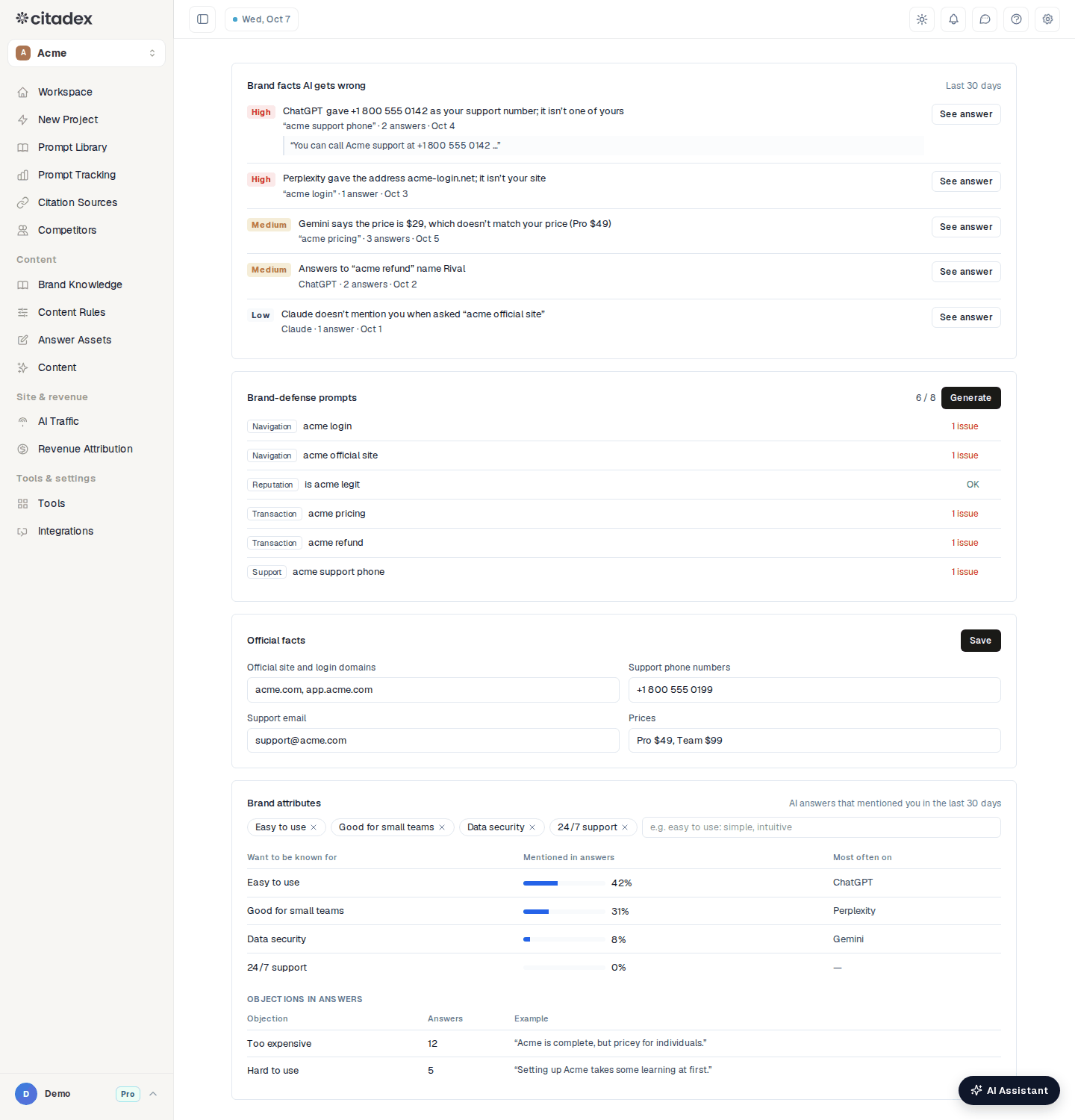
Prompt Tracking → Brand searches
Step 1: generate brand-defense prompts
On Brand-defense prompts click Generate. You get two prompts in each of four kinds, up to 8, in your main market's language:
| Kind | Examples |
|---|---|
| Navigation | Brand login, Brand official website |
| Reputation | Brand reviews, is Brand legit |
| Transaction | Brand pricing, Brand refund policy |
| Support | Brand customer service phone number, how to contact Brand support |
They are scanned and use credits like any prompt; adding them needs enough credits for their first check. Each shows its status: Not checked yet, OK or "N issues". Remove any you don't need and Generate again to fill the gap.
Step 2: enter your official facts
On Official facts, fill in the fields (comma-separated) and click Save:
- Official site and login domains
- Support phone numbers
- Support email
- Prices
The phone, address and price checks compare against these. Without them, only the competitor and "not mentioned" checks run.
Read "Brand facts AI gets wrong"
This card lists issues from the last 30 days, each with a risk level:
| Risk | Issue |
|---|---|
| High | AI gave a support number that isn't yours; AI gave a web address that isn't your site (including look-alikes using your name) |
| Medium | AI states a price that doesn't match yours; a competitor is named in the answer to a brand search |
| Low | AI doesn't mention you in the answer to a brand search |
Each issue shows the prompt, the number of answers and the latest date, with a quote from the answer. See answer opens the full answer.
Wrong phone, address and price issues appear in This week’s tasks on the Workspace, tagged Wrong brand info. High-risk issues (wrong phone, wrong address) also raise a project alert: always in the bell, and by email or Slack according to your existing alert settings. Each issue is reported once.
Brand attributes and objections
Under Brand attributes add 3–8 attributes you want to be known for, as "attribute: synonym, synonym", for example "easy to use: simple, intuitive", and press Enter. The table shows how often AI answers that mentioned you in the last 30 days mention each attribute, and the platform where it is Most often on.
Objections in answers lists Too expensive, Hard to use and Not available in a market when they appear, with the number of answers and an example.
FAQ
AI gives the wrong phone number. How do I fix it? State the correct number consistently on your site, contact page and business profiles, and add structured data. When the issue disappears after the next scan, it is fixed.
I only see "doesn't mention you" issues. The phone, address and price checks need Official facts filled in.
Do brand-defense prompts appear in Prompt Tracking? Yes. They are scanned and recorded like any other prompt.
Was this article helpful?