
Prompt Coverage: Are You Tracking Enough, and What to Add Next
Prompt Library → Coverage shows coverage confidence by buying stage, topic and customer role with 95% intervals, suggests prompts to fill thin groups, combines prompt variants into one recommended probability, and ranks prompts by opportunity score.
What this tab does
You only see the questions you track. The Coverage tab answers three questions: does your prompt set cover each buying stage, topic and customer role well enough; when one question is asked several ways, how likely is AI to recommend you; and which prompts are most worth investing in.
Where: Prompt Library → Coverage.
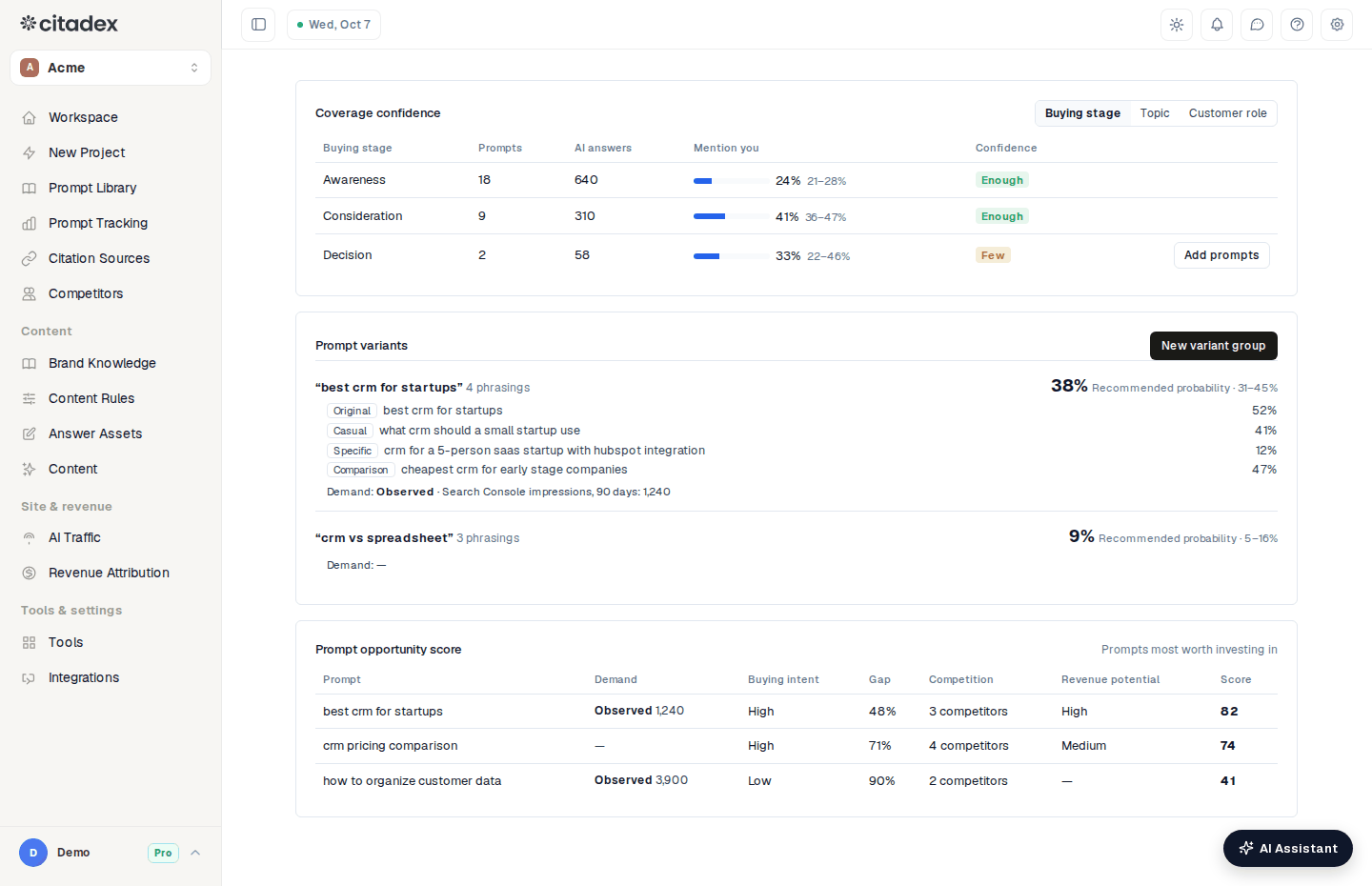
Prompt Library → Coverage
Coverage confidence
Switch between Buying stage, Topic and Customer role at the top right of the card. Each row is one group:
- Prompts: how many prompts are in the group.
- AI answers: how many AI answers those prompts received.
- Mention you: the share of answers that mention you, with a 95% interval.
- Confidence: Enough = at least 5 prompts and at least 30 answers; Few = 2–4 prompts or fewer than 30 answers; None = 0–1 prompts.
Buying stages are Awareness, Consideration and Decision. Topics and customer roles are grouped by AI the first time you open the tab; click Edit groups to change them (one per line) or Regroup to start again.
Add prompts
On a Few or None row click Add prompts. A Suggested list appears with 5 prompts for that group. Tick the ones you want and click Track. If your balance doesn't cover their first check, a Not enough credits to add prompts dialog opens, where you can top up and then add them.
Prompt variants
People ask the same thing in different ways, and AI answers differently. A variant group keeps those phrasings together:
- 1
Click New variant group
- 2
Choose a tracked prompt
- 3
Click Write variants
You get Casual, Specific, Comparison and Rephrase versions.
- 4
Tick the ones you want and click Track
Each group shows "N phrasings", the Recommended probability across all phrasings (with its interval), and every phrasing in the group. Variants are scanned and use credits like any prompt; adding them needs enough credits for their first check.
The Demand line shows a number only when it is observed: Observed · "Search Console impressions, 90 days: N". Without Search Console data it shows "—".
Prompt opportunity score
Prompt opportunity score lists the prompts most worth investing in, scored 0–100 from five factors multiplied together:
| Column | Meaning |
|---|---|
| Demand | Impressions observed in Search Console; "—" when there is none, counted as neutral |
| Buying intent | High / Medium / Low |
| Gap | How much you are missing from AI answers |
| Competition | Number of competitors named in answers |
| Revenue potential | From revenue per topic once Revenue Attribution has data; "—" otherwise |
Before the first scans finish it shows Shown after the first scans.
FAQ
Confidence says Few. Can I still use the number? Yes; the interval is just wider. Add prompts until it reads Enough and the interval narrows, which makes groups easier to compare.
Does adding suggested prompts cost credits? Suggestions are free. Tracking them needs enough credits for their first check, and each scan after that uses credits.
The groups don't match my business. Click Edit groups and rename the topics and customer roles; after saving, prompts are placed in the closest group.
Was this article helpful?