
Agent Readiness: AI Crawlers, the Readiness Score and Simulated Agent Tasks
How AI crawlers are split by purpose (search, user-triggered, training) and what each verdict means, the agent readiness score, the free public check and AI crawler checker, and weekly monitoring and simulated agent tasks on AI Traffic → Agents.
Three kinds of AI crawler
AI companies send crawlers for three purposes, and each needs different handling. The By purpose card at the top of AI Traffic → AI crawlers shows them separately:
| Purpose | What it does | Recommended |
|---|---|---|
| Search | AI search indexing: decides whether AI answers can find and cite you | Allow |
| User-triggered | A person asked the AI to open your page | Allow |
| Training | Used to train future models | Your choice |
Each purpose gets a verdict from your site's robots.txt:
- Allowed: every crawler of this kind can visit.
- Partly blocked: some are blocked; their names are listed.
- Blocked: all of them are blocked.
- Could not read robots.txt: your robots.txt could not be read.
A blocked or partly blocked search or user-triggered purpose is shown in red, because AI cannot fetch or cite you. Blocking training is not flagged. With crawler logs connected, each purpose also shows real visits and the error share ("N visits · N% errors"), or No visits yet.
When robots.txt blocks AI search or user-triggered crawlers, a red notice appears with the lines to add to robots.txt; Copy lines copies them.
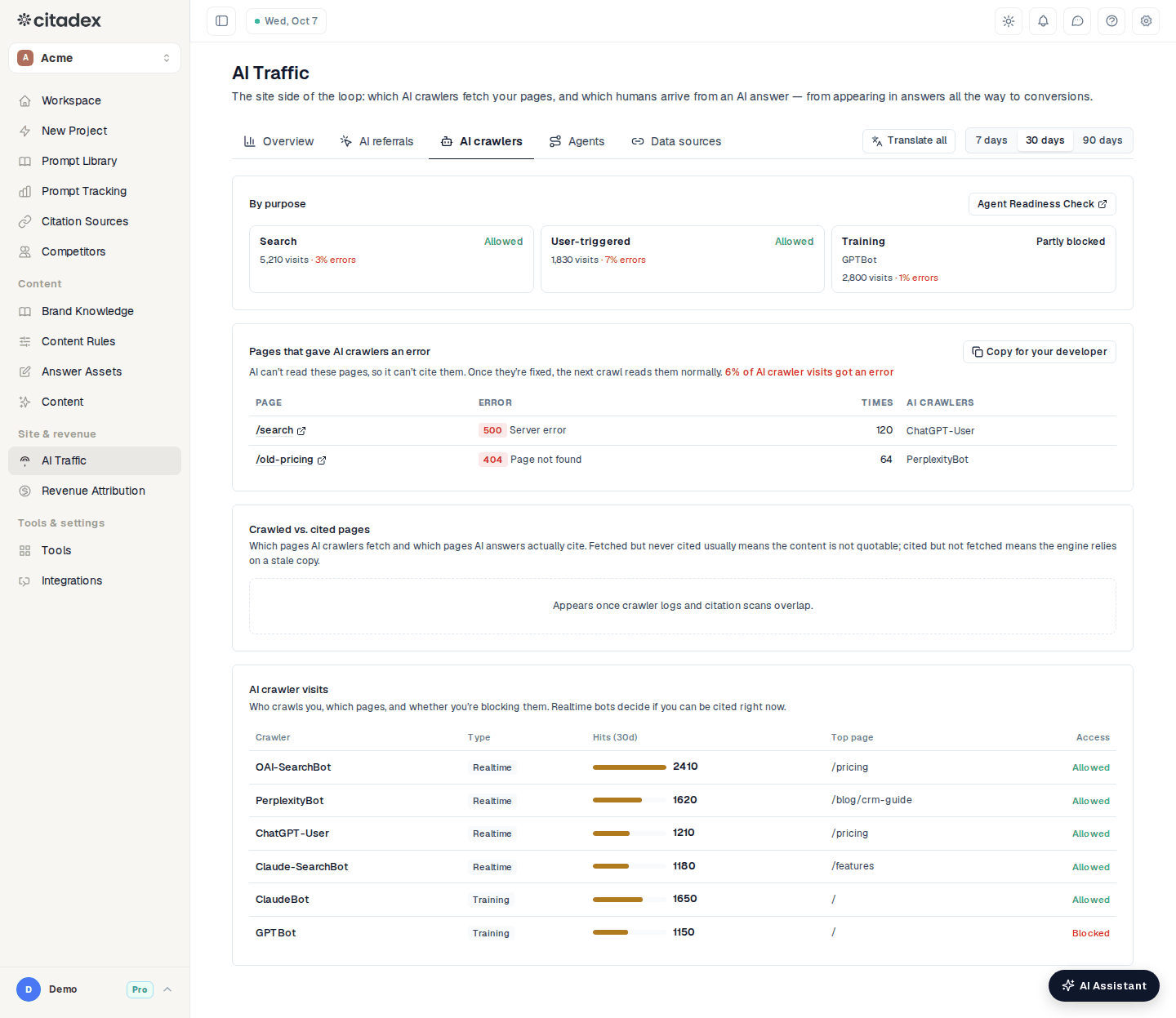
AI Traffic → AI crawlers: by purpose
The agent readiness score
Whether AI agents (AI that finds information, compares and buys on a person's behalf) can find, read and operate your site and complete a purchase, scored 1–100 in four groups: Discoverable, Readable, Operable and Transactable. The checks cover robots.txt access for AI search and user-triggered crawlers, a sitemap, llms.txt, main text readable without JavaScript, structured data, page structure tags, form field labels, button names, login walls, and on product pages Product structured data, price, stock and a buy button. On sites that are not stores, the store items show Not applicable.
Free tools: the public check and the AI crawler checker
- Agent Readiness Check (no login needed): enter a site and click Check. Signed out you see the score, the four groups and Main issues; after Sign up free you see the full checklist with a fix for each item, plus Copy fix list and Ask AI Assistant how to fix. The By purpose card on AI crawlers links to it too.
- AI Crawler Access Checker under Tools in the sidebar: which AI crawlers your robots.txt lets in, by purpose. Check robots.txt on the AI crawlers tab opens it.
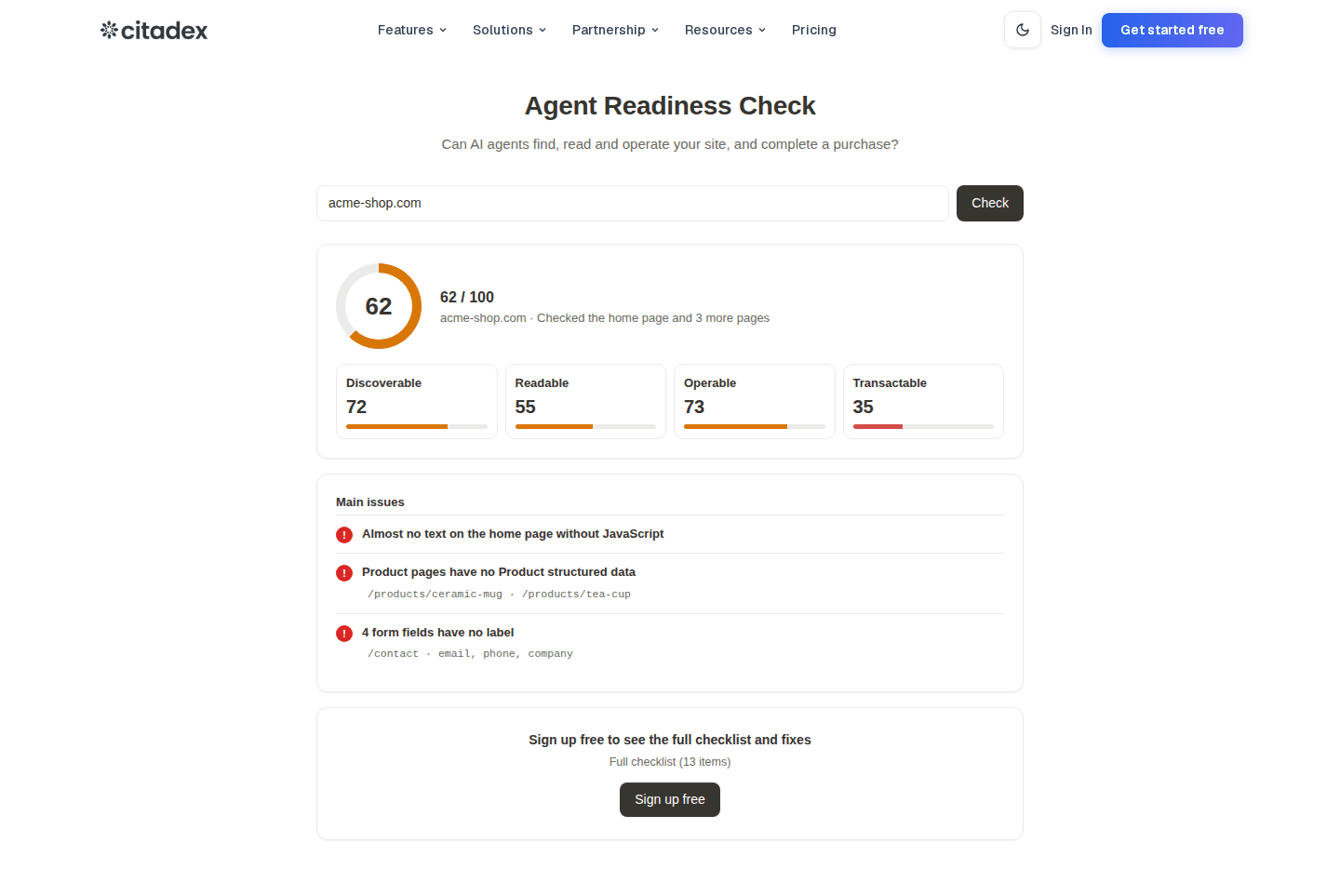
Agent Readiness Check result
Agents tab: weekly monitoring (paid plans)
AI Traffic → Agents, available on paid plans.
The Agent readiness card checks your project's site automatically every Monday and shows the score (last time's in brackets), the four group scores and a history chart. Below it are the New issue and Fixed items since the last check, with the fix for each new issue, plus a line when search and user-triggered AI crawler visits get errors. If the score drops 10 points or more, or an item starts failing, you get a project alert. Check now runs a check immediately at no charge; Full checklist opens the full check page.
Simulated agent tasks
Simulated agent tasks sends a read-only AI agent to try real tasks on your site.
What the agent can and can't do: it only opens and reads pages of your site, at most 8 pages per task. It does not run JavaScript, log in, submit forms, buy or book anything.
Default tasks: six, chosen by site type.
- Store: Find the price, Find a specific product page, Check stock, Find the refund policy, Check shipping to {main market country}, Find a way to contact them
- Service: Find the price, Check service in {main market country}, Find the inquiry form and its required fields, Find where to book a demo, Find the refund policy, Find a way to contact them
Edit tasks lets you remove tasks or type your own (for example "find the price of the enterprise plan") and click Add, up to 10, then Save.
Reading a result: one row per task.
- Result: Done or Failed.
- Where it got stuck: the answer it found when done; "Step N: …" when failed, the step and the element that blocked it.
- Time: steps and seconds.
- Steps: expand to see each page it opened and what it saw.
Running: the tasks run automatically once a week at no charge. To run now, click Run; you first see how many credits the run uses, and it starts only after you click Run again to confirm. If credits are short you see Not enough credits.
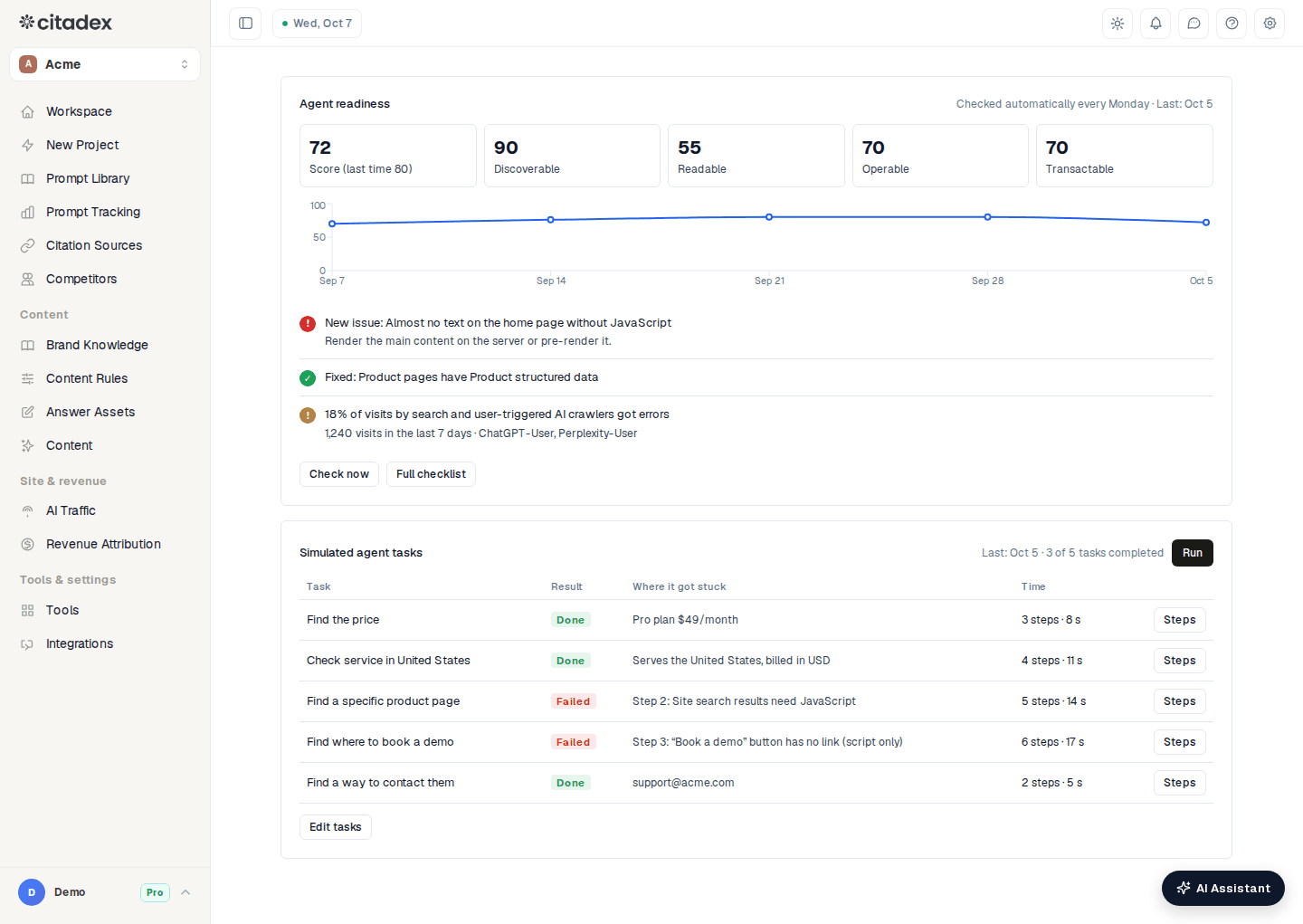
AI Traffic → Agents
FAQ
Should I allow training crawlers? They do not affect whether AI search can cite you, so it is your call. Allow search and user-triggered crawlers.
The Agents tab says "Add the project’s website first". Set the website in the project settings; checks and tasks need it.
A task failed. What do I change? Look at Where it got stuck and Steps. Common causes: price or stock loaded only by JavaScript, or information behind a login. Apply the fixes from the readiness checklist; the next weekly run re-checks automatically.
Is any of this free? The public check and the AI crawler checker are free. Weekly monitoring and simulated tasks on the Agents tab need a paid plan.
Was this article helpful?