
AI Traffic — Crawlers, Referrals, Agents and the Optimization Plan
The five tabs of AI Traffic: Overview, AI referrals, AI crawlers (by purpose, To fix this week, Optimization plan, AI-optimized versions), Agents and Data sources (Google Analytics, tracking snippet, Cloudflare, Vercel, WordPress, Next.js, Netlify).
What it measures
Citation data tells you what AI says. AI Traffic tells you what happens on your site: which AI crawlers read your pages and whether they hit errors, which people arrive from AI answers, and whether AI agents can complete tasks on your site. The page shows only connected data and stays empty until a source is connected.
Tabs
| Tab | What it shows |
|---|---|
| Overview | Full-loop attribution (appear in answers → pages crawled → human referrals → conversions), the trend, and "Who only reads, and who sends customers" |
| AI referrals | Visitors from ChatGPT, Perplexity, Gemini and others, landing pages and conversions |
| AI crawlers | The verdict by purpose, crawler visits, error pages, new-article crawls, Optimization plan, AI-optimized versions |
| Agents | Agent readiness monitoring and simulated agent tasks |
| Data sources | Connect Google Analytics, the tracking snippet and crawler logs |
AI crawlers: by purpose
AI companies run three kinds of crawler, for different purposes:
| Purpose | What it does | Examples |
|---|---|---|
| Search | AI search indexing: decides whether AI answers can find and cite you | OAI-SearchBot, PerplexityBot, Claude-SearchBot |
| User-triggered | A person asked the AI to open your page | ChatGPT-User, Perplexity-User, Claude-User |
| Training | Used to train future models | GPTBot, ClaudeBot |
The By purpose block gives a verdict for each: whether robots.txt allows, blocks or partly blocks it, plus real visits and the error rate. Blocking search or user-triggered crawlers directly affects whether AI can cite you now; whether to allow training is your call.
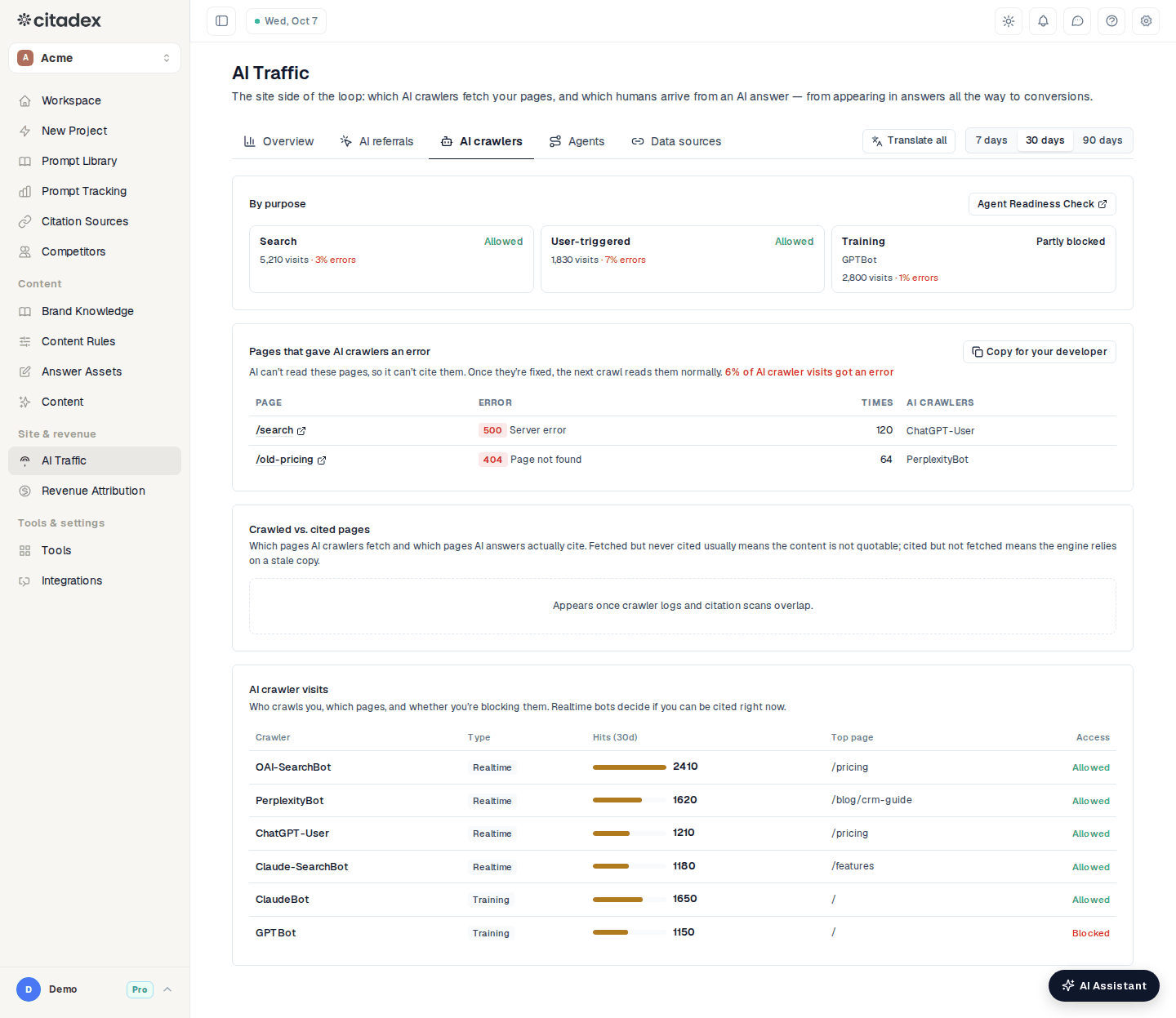
AI Traffic → AI crawlers by purpose
The same tab also has:
- To fix this week. Biggest impact first; items disappear once they are fixed. For example robots.txt blocking a search crawler (See how to fix) or pages returning errors to AI crawlers (See pages).
- Pages that gave AI crawlers an error. Error code, count and crawlers; Copy for your developer produces a note you can send as is.
- New articles: has AI fetched them? Articles published in the last 60 days, the first AI fetch, fetch count and whether they are cited; Speed up lists ways to get one fetched sooner.
- Crawled vs. cited pages. Fetched and cited, fetched but never cited, cited but not fetched recently. Pages AI reads but never cites have an Optimize button.
- Click any page to open its drawer with crawls, citations and visits.
Optimization plan
The Optimization plan (opened from the AI crawlers tab) lines up the pages to change:
- This week: the pages most worth fixing first. Each is marked A few edits or Needs a rewrite. Change list says exactly what to change (now → change to, plus new Q&As and structured-data code to copy); change lists don't count as an article. Full rewrite writes a new version of the whole page and counts as one article. When a page is done, click "Done, start retest".
- Prompt ownership: each question is answered by one page, and you can change which; duplicate pages get a suggestion to merge and 301-redirect.
- Change list: every change list made so far.
The AI Assistant's weekly plan prepares change lists for up to 3 pages in advance; see Weekly plan.
AI-optimized versions
When you can't edit the site, create an AI-optimized version of a page: only AI crawlers see it, while visitors, Google and Bing keep getting the original. It says the same as the original, written so AI reads and cites it more easily. Preview compares the two; once AI only is on, the table shows reads and citations since switching on. It works with the Cloudflare Worker, Next.js, Netlify or WordPress setup under Data sources.
Agents
The Agents tab (paid plans) checks your site's agent readiness every Monday and keeps a history chart, new issues and fixed items, and the error rate of search and user-triggered crawlers; it alerts you when the score drops 10 points or more or an item starts failing. Simulated agent tasks let a read-only AI agent try tasks on your site such as finding a price, a product, the refund policy or an inquiry form, and record whether it succeeded, the step it got stuck at and why. See Agent readiness.
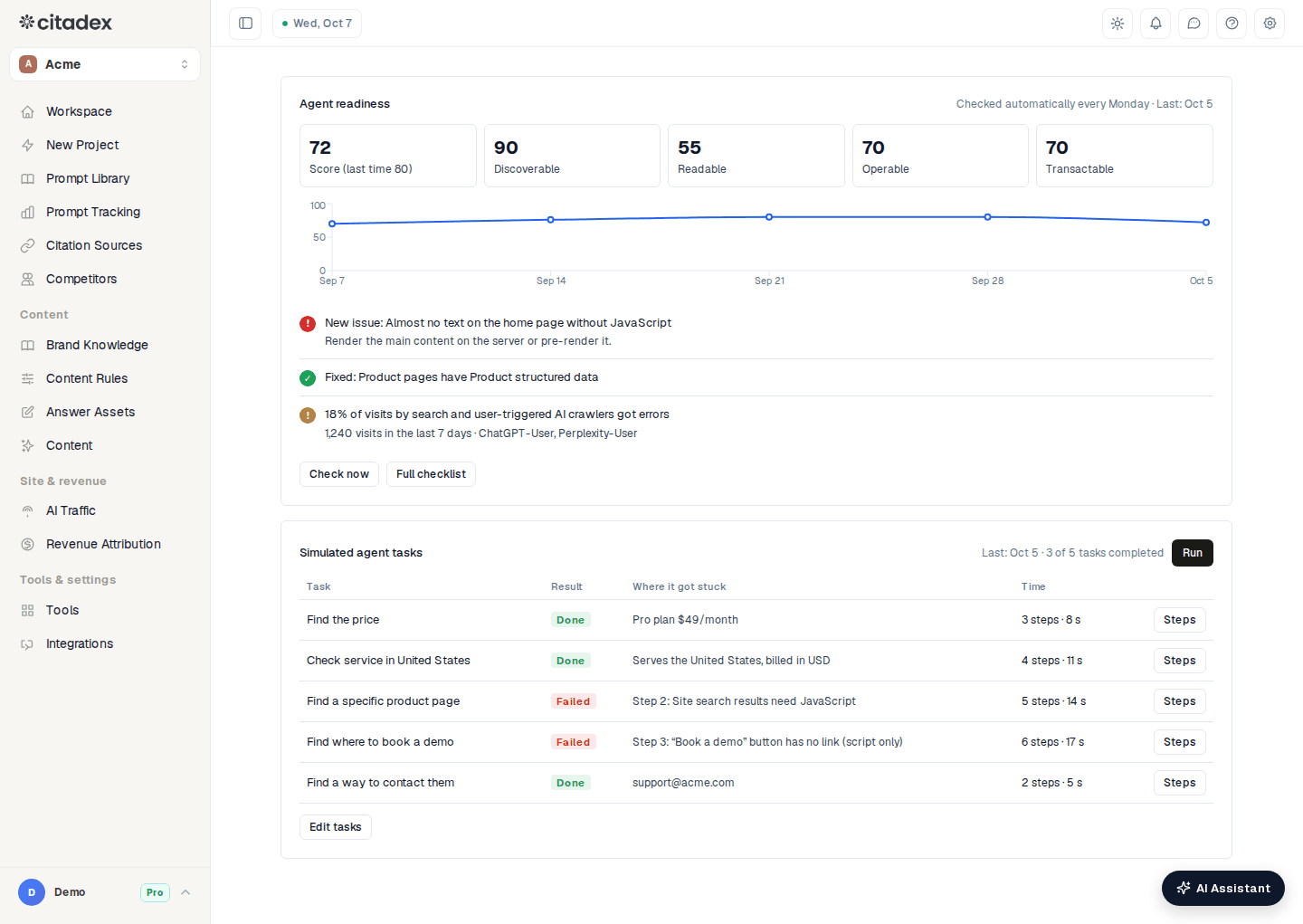
AI Traffic → Agents
Data sources
Each project has its own ingest key; Use a new key makes the old one stop working at once. Pick one or more:
- Google Analytics (conversions): Authorize Google Analytics, then choose the property. No code. Only the workspace owner can connect it.
- Website tracking snippet: paste one line into your site's head to record visitors who arrive from AI; call the conversion function on your goal to record conversions. Use it for sites without Google Analytics.
- AI crawler monitoring (server logs):
- Cloudflare: Direct connection (recommended) takes a read-only API token and Zone ID and pulls AI-crawler requests every hour, with no Worker to deploy; a Worker is also available.
- Vercel: Team settings → Drains, add a log drain with the address shown on the page as the destination.
- WordPress: download the plugin, upload and activate it.
- Next.js, Netlify: save the code shown on the page in your project and redeploy.
- Other server: forward AI-crawler requests following the example on the page.
Even with nothing connected, the crawler table checks your robots.txt and flags AI engines you block. To continue the funnel to leads, deals and revenue, use Revenue Attribution; see Revenue attribution.
Alerts
Turn on "AI traffic issues (crawl drops, blocks, errors)" under Settings → Email Notifications → Project alert notifications to get an email or Slack message at your chosen frequency.
Frequently asked questions
Pages are cited by AI, so why no visits? Most AI answers carry no link, or people don't click. Check "Who only reads, and who sends customers" on Overview: the fewer fetches per visit sent, the better that AI is at sending readers to you.
Is this related to Search Console? No. Search Console is used for indexing pings after publishing and for importing prompts; AI Traffic is site-side data.
Was this article helpful?